SSP(Shared service provider) in sharepont 2007 is turnedout to Service Applications in new sharepoint 2010.
SSP contains all the services in 2007. now each individual service is a stand alone Service application.
Ex: Search service application , People Service application, Metadata Service application...
each of these service applications has its own content DB's.
one application can have many instances of these services.
for example we can create 2 metadata services 1 for enterprise and 1 for bankingdomain
and we can link this service applications to more than one webapplication.
we can configure this service application when we creating the webapplication or we can configure this later by going..
Central Admin-> Manage Service applications -> Select the application (or)Create new -> enter the values for properties or edit the properties.
making services to run independently gives u more performance and more reusability.
Thursday, 19 November 2009

Wednesday, 18 November 2009
Document Sets in Sharepoint2010.
Sharepoint 2010 is introducing new concept called DocumentSets.
Using this documentsets we can run workflows on set of documents,manage permissions,manage security..
Using this documentsets we can run workflows on set of documents,manage permissions,manage security..
Inherting power of WIKI's in sharepoint 2010.
Now we can edit the sharepoint pages online.
And also we can also use the syntax of WIKI's. which is a good news for WIKI Lovers.
example :
==Section==
[[Article name#Section heading]]
etc...
more info on wiki editings
http://en.wikipedia.org/wiki/Wikipedia:Section
And also we can also use the syntax of WIKI's. which is a good news for WIKI Lovers.
example :
==Section==
[[Article name#Section heading]]
etc...
more info on wiki editings
http://en.wikipedia.org/wiki/Wikipedia:Section
PowerPivot in sharepoint 2010 previously called as GEMINI
PowerPivot is previously called as "GEMINI".
Power Pivot is an inmemory database technology that runs on server or client.
we have
1) SQLServer powerPivot for excel
and
2)SQLServer powerPivot for sharepoint2010.
Using this power pivot we can manage millions of records and we can search in seconds for the data. :)
Power Pivot is an inmemory database technology that runs on server or client.
we have
1) SQLServer powerPivot for excel
and
2)SQLServer powerPivot for sharepoint2010.
Using this power pivot we can manage millions of records and we can search in seconds for the data. :)
Opening office files in browser using sharepoint 2010. (Browser enabled documents)
using sharepoint 2007 we can only open the office files using rich clients. like powerpoint , word ,excel.
Using shareoint 2010 we can open the office files in browser as well as client s/w.
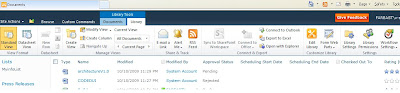
select Library Tools(from ribbon) -> Select Library Settings->Advanced settings
u will able to see the section opening documents in browser as below.
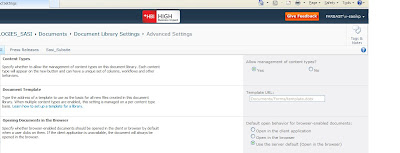
default option is to open in the browser. choose the option required and save.
Using shareoint 2010 we can open the office files in browser as well as client s/w.

select Library Tools(from ribbon) -> Select Library Settings->Advanced settings
u will able to see the section opening documents in browser as below.

default option is to open in the browser. choose the option required and save.
Working Offline using sharepoint workspace.
We can work offline using sharepoint workspace.
for a real scenario if we are working in the plane and want to edit some data in sharepoint lists or documents we can move the data to the sharepoint workspace.
we can work on that and once the network is available we can sync with the sharepoint2010. :)
to do this : Goto SiteActions-> Sync to sharepoint workspace.
for a real scenario if we are working in the plane and want to edit some data in sharepoint lists or documents we can move the data to the sharepoint workspace.
we can work on that and once the network is available we can sync with the sharepoint2010. :)
to do this : Goto SiteActions-> Sync to sharepoint workspace.
Easy Navigation in web administration.
People who uses sharepoint 2007 administration faced trouble in navigation.
administrators moves from page to page and the navigation is not completely done in 2007 where people unable to reach the page which they came from.
This problem got solved in new sharepoint 2010. :)
administrators moves from page to page and the navigation is not completely done in 2007 where people unable to reach the page which they came from.
This problem got solved in new sharepoint 2010. :)
Subscribe to:
Posts (Atom)

